Bank Statement OCR Pricing: What You'll Actually Pay in 2026

Bank statement OCR pricing runs on three models: per-page (typically fractions of a cent to several cents per page), per-document (often $0.05 to $0.75 per statement for specialized parsers), and subscription tiers that bundle a monthly page allowance with overage charges. Low-volume users pay-as-you-go and typically spend a modest amount monthly without subscription; mid-market teams processing thousands of statements often subscribe to mid-level plans with monthly fees in the hundreds to low thousands; enterprises negotiate committed-volume contracts which lower per-page costs but involve annual commitments.
- Solo accountants and freelancers: pay-as-you-go or entry subscription tiers, usually under 500 pages monthly
- Mid-market bookkeeping and CPA firms: professional tiers with monthly allowances plus predictable overage rates
- Enterprise finance teams: committed-volume contracts with custom SLAs and dedicated support
This guide breaks down what drives the gap between list price and what you'll actually pay, then walks through a worked cost estimate you can adapt to your own volume.
Key Takeaways
Bank statement OCR pricing depends less on the quoted per-page rate than on exception labor, integration costs, and how well the output maps to your actual tax and bookkeeping workflow.
| Point | Details |
|---|---|
| Pricing models vary | Per-page, per-document, subscription, and commitment tiers each measure cost differently, so compare like units. |
| Structured extraction costs more | Table and field extraction for bank statements runs higher per page than plain text OCR, and that's expected. |
| Exception labor drives TCO | Manual review time on flagged transactions often doubles the effective cost beyond the subscription fee. |
| Watch overage and minimums | Overage rates and committed-spend minimums frequently matter more than the advertised base price. |
| Taxbatchpro reduces categorization cost | Its tiered plans include automated Schedule C mapping, cutting the manual labor that inflates OCR total cost of ownership. |
Table of Contents
- What Are the Main Bank Statement OCR Pricing Models?
- What Costs Add Up Beyond the List Price?
- How Do You Estimate Your Own Annual Cost?
- What Pricing Traps Should You Watch For?
- How Does Security and Compliance Affect Pricing?
- How Do You Choose the Right Pricing Plan?
- Why the Cheapest Quote Rarely Wins
- Where TaxBatchPro Fits in Your Pricing Decision
- Sources
What Are the Main Bank Statement OCR Pricing Models?
Vendors price bank statement OCR extraction in four distinct ways, and confusing them is the fastest way to misjudge a quote. Per-page pricing charges for every page processed, regardless of how many transactions or fields appear on it. Per-document pricing charges a flat rate per file, which favors you when statements run long but penalizes you if you process many short documents. Subscription pricing bundles a monthly page or document allowance into a flat fee with overage rates kicking in once you exceed it. Commitment or volume pricing locks in a discounted rate in exchange for a minimum monthly or annual spend.
Multipage statements complicate all four models. A 12-page credit card statement with transaction tables on every page costs more to process than a 12-page statement that's mostly disclosures and boilerplate, because table and field extraction is computationally heavier than plain text recognition. Amazon Textract's pricing examples show this directly: raw text detection runs far cheaper per page than form and table analysis, and bank statements almost always require the latter since you need structured transaction data, not just readable text.
Qualitative ranges tend to break out this way:
- Entry-level tools: pay-as-you-go, priced for occasional or seasonal use, often with a free tier for testing
- Professional tiers: monthly subscriptions with allowances in the low thousands of pages, built for firms with recurring client volume
- Enterprise tiers: custom, committed-volume agreements with dedicated onboarding and negotiated per-page rates
What Costs Add Up Beyond the List Price?
The quoted per-page rate is rarely what you end up paying once a tool is live in your workflow. Four cost categories consistently get left out of vendor comparisons.
- Implementation and onboarding: initial setup, template configuration for your statement formats, and staff training, often billed as a one-time fee or bundled into the first quarter of a contract
- Exception and validation labor: someone on your team still has to review flagged transactions, correct misread fields, and reconcile totals when OCR confidence is low
- Integration engineering: connecting the OCR output to your accounting software, general ledger, or tax workflow, which can require middleware or custom API work
- Model drift and retraining: banks periodically redesign statement layouts, and vendors may charge for updates that keep extraction accuracy from degrading over time
Exception labor is the category most buyers underestimate. If your team spends even fifteen minutes per flagged document reviewing extracted data, that adds real hourly labor cost on top of the subscription. Amazon's pricing structure treats list price purely as a compute cost. It says nothing about the human review layer, and that layer is where total cost of ownership tends to double against the sticker price.
Pro Tip: Ask any vendor for their average exception rate on bank statements specifically, not their blended rate across all document types. Bank statements have denser tables than invoices or receipts, so a vendor's "95% accuracy" claim on mixed documents can look very different once you isolate statement performance.

How Do You Estimate Your Own Annual Cost?
A worked example beats guesswork every time, and you can build one in about ten minutes using your own volume data.
- Estimate your monthly document and page volume. Count how many statements you process per month and average pages per statement. A firm handling 40 client accounts with two statements each, averaging 8 pages, works out to roughly 640 pages monthly.
- Map that volume against two pricing models. Run the same 640 pages through a per-page rate and again through a subscription tier's allowance plus overage rate. This exposes where the crossover point sits, since per-page pricing often wins at low volume while subscriptions win once you exceed the allowance.
- Add integration and exception labor. Estimate hours your team will spend reviewing flagged extractions and add that hourly cost to the platform fee. If your bookkeeper reviews 5% of pages at 10 minutes each, that's over five hours a month at loaded labor cost.
- Annualize and compare against cloud-OCR benchmarks. Google Document AI's pricing table lists a bank statement parser as a per-classified-document charge, which gives you a useful reference point since specialized parsers typically cost more per unit than generic OCR but require less manual cleanup.
For that 640-page monthly example, a mid-tier subscription costing several hundred dollars monthly, combined with review labor, often results in a total annual cost in the low thousands including onboarding. The exact number depends heavily on your exception rate, which is why piloting with your own statements matters more than trusting a vendor's advertised accuracy figure.
What Pricing Traps Should You Watch For?
Free tiers and free credits are useful for testing, but they're deliberately capped low. Most vendors offer somewhere between a handful and a few hundred free pages or documents, enough to run a pilot but not enough to reveal how pricing behaves at your real volume. Test messy, real-world statements during any free trial, not clean sample PDFs the vendor provides.
- Overage rates matter more than base tiers. A cheap base subscription with an expensive overage rate can cost more than a pricier tier with generous overage terms, especially if your volume fluctuates seasonally around tax season.
- Hidden fees hide in the specifics. Watch for charges tied to non-standard export formats, audit log access, compliance documentation requests, or custom SLA terms.
- Minimums lock you in. Some commitment tiers require a minimum monthly spend regardless of actual usage, which punishes you in slow months.
- Negotiate before you sign. Ask about pilot periods, committed-volume discount windows, and whether the vendor will run an escrowed sample conversion on your actual statements before you commit to a contract.
How Does Security and Compliance Affect Pricing?
Compliance requirements aren't just a checkbox for accounting workflows, they're a pricing variable. Vendor security documentation commonly lists SOC 2 Type II certification and AES-256 encryption at rest and in transit as either standard features or enterprise add-ons, and the difference matters to your budget.
- SOC 2 Type II and encryption confirm the vendor has audited controls around data handling, which most CPA firms and accounting teams require before uploading client financial data
- Data retention and deletion policies, plus audit log access, often carry additional per-request or per-report fees at lower tiers
- DPA or BAA agreements and custom security assessments typically only become available, sometimes at added cost, at professional or enterprise tiers
- On-premises or containerized deployment is a premium option reserved for enterprise contracts with strict data residency requirements
Budget for these items upfront rather than discovering them mid-negotiation, since compliance requests can also add weeks to a procurement timeline.
How Do You Choose the Right Pricing Plan?
Comparing vendor quotes side by side only works if you're asking each vendor the same questions and measuring the same volume assumptions.
- Document your expected monthly and peak volumes, including seasonal spikes around tax deadlines when statement processing often triples.
- Set an allowable exception budget, meaning how many labor hours per month you're willing to spend on manual review before a vendor's accuracy becomes a dealbreaker.
- List your required export formats, whether that's Excel, CSV, or a direct integration with your accounting or tax software.
- Define your SLA needs, including uptime guarantees and turnaround time during peak season.
- Request specific answers from every vendor: pilot terms and length, a worked overage example at your projected volume, a sample contract clause on data retention, and what audit support looks like if a client or regulator asks for records.
A solo accountant weighs simplicity and low minimums most heavily. A mid-market team weighs integration depth and exception rate. An enterprise buyer weighs contract flexibility, compliance documentation, and dedicated support. Match your evaluation criteria to which of those three profiles actually describes your business, not which one sounds more sophisticated.
Why the Cheapest Quote Rarely Wins
Everyone evaluating bank statement OCR pricing starts by comparing the number on the page, and that's exactly backward. The per-page or per-document rate is the smallest lever in your total cost, and treating it as the deciding factor is how procurement teams end up with a tool that looks cheap in the proposal and expensive in practice six months later.
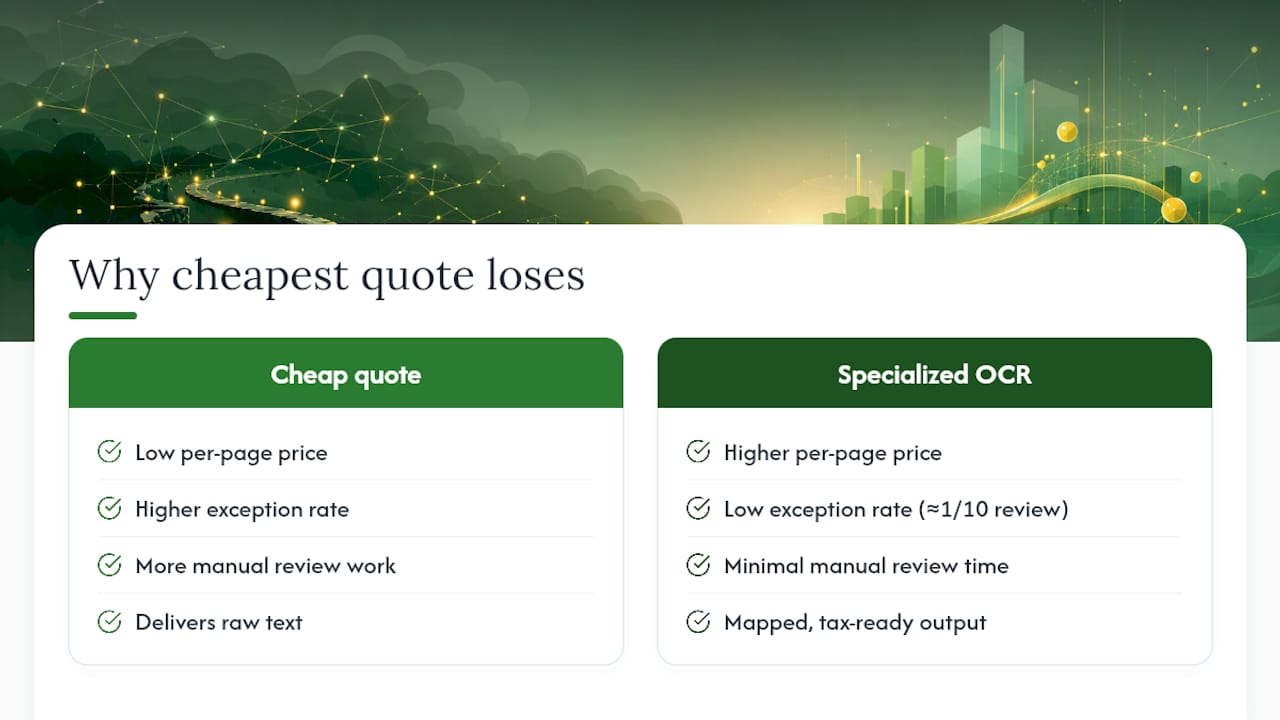
What actually separates a good deal from a bad one is exception rate. A vendor charging twice the per-page rate but requiring a tenth of the manual review time will save you money and staff hours every single month, and most buyers never run that math because it requires piloting real statements, not sample PDFs cherry-picked by the vendor's sales team. The specialized parsers built for bank statements specifically, rather than generic document OCR retrofitted for financial data, tend to justify their premium here because they're already tuned to output the structured, mapped fields your workflow needs instead of raw text you still have to organize.
The other overlooked factor is what happens to your data after extraction. A tool that hands you clean text is only half the job. If you're preparing for tax season, the real value is in getting straight to tax-ready categorized output rather than paying a lower subscription fee and then paying your staff to manually map every transaction to a Schedule C category afterward. That labor cost never shows up in the vendor's pricing page, but it shows up in your P&L every April.
— Ian
Where TaxBatchPro Fits in Your Pricing Decision
Taxbatchpro was built specifically around the cost drivers this guide just walked through. Instead of handing you raw extracted text that still needs manual categorization, Taxbatchpro's platform for accounting professionals maps transactions directly to IRS Schedule C categories during batch conversion, which is exactly the exception labor cost most OCR vendors leave on your desk.
The platform processes a full year of bank and credit card statements into structured, audit-ready Excel spreadsheets in under 90 seconds per batch, so the labor math from your worked cost estimate shifts substantially in your favor. Pricing follows the tiered subscription model this article recommends evaluating: a free tier for testing with your own statements at Taxbatchpro's free converter, paid plans for individuals and firms with recurring volume, and volume-based options for larger accounting practices. If you're preparing for tax season specifically, the IRS-ready conversion workflow is worth testing against your actual client statements before you commit to any subscription tier elsewhere.
Sources
Cloud-OCR benchmarks come from Azure Document Intelligence, Google Document AI, and Amazon Textract. Use their calculators, then call sales for committed-volume discounts.
- Amazon Textract pricing