Invoice Reconciliation Meaning: A Practical Guide for AP

Invoice reconciliation means matching every vendor invoice against the records that prove it's valid, most often a purchase order, a goods receipt, and the payment ledger, before the business releases money. Done correctly, it delivers three things: you pay the right amount to the right vendor, you catch errors or fraud before cash leaves the account, and you leave behind an audit trail that holds up under scrutiny. The core documents involved are the purchase order (PO), the goods receipt or receiving report, the invoice itself, and the bank or payment record that closes the loop. If any of those four don't line up, that's your signal to stop and investigate before posting.
Key Takeaways
Invoice reconciliation works because it forces every payment to prove itself against a purchase order, a receipt, and an invoice before cash moves.
| Point | Details |
|---|---|
| Definition anchors the process | Invoice reconciliation matches invoices to POs, receipts, and payment records to confirm legitimacy and accuracy. |
| Matching type depends on risk | Use two-way for low-risk recurring spend, three-way as the default, four-way for regulated or high-value goods. |
| Tolerances prevent wasted effort | Configured percentage or dollar thresholds let minor variances auto-approve while material ones escalate. |
| Automation shifts, not eliminates, work | Staff move from manual keying to exception management and governance over matching rules. |
| Documentation protects you later | Retaining POs, receipts, and approvals for every invoice builds the audit trail regulators expect. |
Table of Contents
- What Does Invoice Reconciliation Actually Cover?
- Why Does Invoice Reconciliation Matter for Your Business?
- What Are the Different Types of Invoice Matching?
- How Do You Reconcile an Invoice Step by Step?
- What Causes Invoice Discrepancies and How Do You Fix Them?
- How Does Automation Change the Reconciliation Process?
- What Should a Reconciliation Checklist Include?
- What Does a Three-Way Match Look Like in Practice?
- How Often Should You Reconcile Invoices?
- What Changes for AP Teams as Automation Matures?
- What Should Finance Teams Prioritize Right Now?
- Where Can You Learn More About Invoice Matching?
- Frequently Asked Questions
- Sources
What Does Invoice Reconciliation Actually Cover?
Invoice reconciliation sits inside accounts payable, but it touches procurement, receiving, and treasury too. At its core, it's the process of matching an invoice against the purchase order that authorized the spend, the receiving report confirming goods or services actually arrived, and sometimes the underlying contract that sets pricing terms. The goal, as one guide to the process puts it, is confirming an invoice is legitimate, its amounts are correct, and the transaction gets recorded accurately.
AP teams typically pull from these records during reconciliation:
- Purchase orders (POs) with agreed pricing and quantities
- Goods receipt notes (GRNs) or service completion confirmations
- Vendor contracts and pricing agreements
- The vendor invoice itself, including tax and freight lines
- Payment records and remittance advice
It's worth distinguishing invoice reconciliation from two terms accountants often lump together with it. Bank reconciliation compares your internal cash ledger to what the bank actually shows, catching timing differences and bank errors. Billing reconciliation typically refers to the accounts receivable side, verifying that customer invoices match contracts or usage before you send a bill out. Invoice reconciliation, by contrast, is squarely an accounts payable function focused on inbound vendor invoices, and its endpoint is a payment decision, not a balance confirmation.
Why Does Invoice Reconciliation Matter for Your Business?
Skipping or rushing reconciliation costs money in ways that don't always show up immediately. A disciplined matching process prevents overpayments, flags duplicate billing before it hits your books, and gives your finance team real visibility into upcoming cash obligations instead of guessing.
The direct payoffs include:
- Overpayment prevention by catching price or quantity errors before payment posts
- Fraud detection, since duplicate invoices and fictitious vendors rarely survive a proper three-way check
- Better cash flow visibility, because you know exactly what's owed and when
- Fewer vendor disputes, which protects relationships with suppliers you depend on
- A cleaner audit trail, since every payment ties back to documented approval
A well-managed matching process leads to faster settlement of vendor dues and fewer downstream disputes, according to HighRadius, particularly for invoices that don't map to a general ledger code automatically. That speed matters at tax time too. Clean, reconciled records are exactly what auditors and the IRS want to see, and they're the foundation for accurate tax return preparation.
What Are the Different Types of Invoice Matching?
Not every invoice needs the same level of scrutiny, and picking the wrong matching type either wastes staff time or leaves you exposed. Accounts payable systems generally support three tiers, and Microsoft's own accounts payable documentation confirms that most platforms let you configure matching types with unit-price or price-total tolerances rather than demanding exact matches on every line.
Two-way matching compares the invoice against the purchase order only, checking that price and quantity ordered match what's billed. It's fast and cheap to run, but it can't confirm the goods or services were actually delivered, which makes it a weaker control for physical inventory.
Three-way matching adds the goods receipt note into the mix, verifying invoice, PO, and proof of delivery all agree. This is the industry standard for solid control because it confirms the vendor actually delivered what they billed for, and it's a strong defense against duplicate payments and billing fraud.
Four-way matching goes one step further by adding an inspection or quality report, confirming not just that goods arrived but that they met spec. This is common in manufacturing and regulated industries where a damaged or noncompliant shipment can't simply be treated as "received."
Here's how to think about which one fits:
- Use two-way matching for recurring, low-risk services like software subscriptions or utility bills
- Use three-way matching as your default for physical goods and most vendor spend
- Use four-way matching for high-value or regulated purchases where quality verification matters, like pharmaceuticals or precision components
How Do You Reconcile an Invoice Step by Step?
The mechanics of invoice reconciliation follow a consistent sequence regardless of company size, though the tools involved vary widely.
- Capture the invoice. It arrives by email, mail, or vendor portal and gets logged into the AP system, either manually or through automated extraction.
- Extract the data. Line items, totals, tax, vendor ID, and PO reference get pulled out, either by a human keying it in or by OCR software reading the document.
- Match against source documents. The system or the AP clerk compares the invoice to the PO and, where applicable, the goods receipt.
- Flag or resolve exceptions. Anything outside the agreed tolerance gets routed for review rather than approved automatically.
- Route for approval. Once matched (or once an exception is resolved), the invoice goes to the appropriate approver based on dollar thresholds.
- Post to the ledger and schedule payment. The approved invoice hits the general ledger and joins the payment run.
Each step has an owner. Procurement issues the original PO. Receiving logs the goods receipt when the shipment arrives. AP runs the actual match and chases down exceptions. Approvers, often department managers or controllers, sign off once amounts clear their authority level. Clear ownership at each handoff point reduces finger-pointing and speeds resolution when something doesn't match.
Document retention deserves its own line item here. Every PO, receipt, invoice, and approval record should stay attached and retrievable, because an auditor asking about a payment six months later shouldn't require a scavenger hunt through email threads. Structured, secure document handling practices make this far less painful when tax season or an audit request arrives.
What Causes Invoice Discrepancies and How Do You Fix Them?
Most reconciliation problems repeat themselves once you've seen them a few times. The usual suspects:
- Price variance, where the invoiced unit price doesn't match the PO
- Quantity discrepancies, where the invoice bills for more or less than what was received
- Missing PO numbers, which stall the invoice before matching can even start
- Duplicate invoices, often from a vendor resubmitting after a slow payment
- Partial shipments, where the invoice covers a full order but only part arrived
- Tax or currency mismatches, especially with international vendors
Resolution follows a fairly standard path: pull the PO and receiving documentation, contact the vendor or internal requester for clarification, and document whatever correction gets made before reposting. For missing PO numbers, loop in procurement directly rather than guessing which order it belongs to.
Reserve manual escalation for variances that cross that threshold or repeat across multiple invoices from the same vendor.*
How Does Automation Change the Reconciliation Process?
Automation doesn't eliminate reconciliation, it changes what your team spends time on. Modern platforms handle the mechanical matching work; the exceptions still need a human decision.
What automated systems typically bring to the table:
- OCR and AI-based data capture that pulls invoice details without manual keying
- Direct integration with PO systems, goods-receipt logs, and your ERP
- Configurable matching rules and tolerance thresholds by vendor or category
- Automatic routing of exceptions to the right approver
- A built-in audit log tracking every match, override, and approval
When evaluating a platform, check these criteria before committing:
- Does it integrate with your existing ERP and procurement systems via API?
- Can you configure tolerances by vendor, category, or dollar threshold?
- How does it handle exception workflows, and can you customize routing rules?
- What reporting does it provide on touchless rate and cycle time?
- What security and compliance certifications does it carry?
Automation captures invoices, validates the data, and compares it against POs or receipts using your configured rules, letting the system auto-approve routine matches while exceptions get routed to a human reviewer. The ROI shows up in three metrics worth tracking from day one: touchless rate (invoices processed with zero human intervention), exception volume, and average cycle time from receipt to payment.
What Should a Reconciliation Checklist Include?
A consistent checklist beats relying on individual judgment call by call. Build yours around these controls:
- Enforce PO requirements for all but the smallest, pre-approved recurring expenses.
- Set matching tolerances in writing, not as an informal understanding between two people.
- Define an exception SLA, such as initial review within 24 hours and resolution within 5 business days.
- Retain documentation for every invoice, PO, and receipt for at least the IRS-mandated retention period.
- Run periodic audits of a sample of approved invoices, not just the flagged exceptions.
Assign clear ownership for exceptions, typically a senior AP staffer or controller, so unresolved items don't sit untouched for weeks. Backlogs form fastest when nobody's job explicitly includes clearing them, which is where a dedicated error-reduction process pays for itself quickly.
What Does a Three-Way Match Look Like in Practice?
Say a PO authorizes 100 units at $25 each, for a total of $2,500. The goods receipt confirms all 100 units arrived. The vendor invoice, though, bills $25.50 per unit, for a total of $2,550.

If your configured tolerance is set at an appropriate percentage, this invoice auto-approves and posts without anyone touching it. Lower tolerance settings kick it out as an exception for someone to review, likely a small pricing update the vendor forgot to communicate.
Under two-way matching, the same scenario plays out identically since two-way only checks invoice against PO, ignoring the goods receipt entirely. The difference shows up when quantities don't match reality: if only 90 units actually arrived but the invoice bills for 100, two-way matching would approve it because the PO and invoice technically agree, while three-way matching catches the shortfall immediately because the GRN shows only 90 received.
- Outcome under 3% tolerance: auto-approved
- Outcome under 1% tolerance: routed for exception review
- Outcome if quantity is wrong: caught only by three-way matching
How Often Should You Reconcile Invoices?
High-volume operations running automated matching can reconcile in near real time, with invoices processed as they arrive. Smaller teams without automation typically batch the work weekly or monthly, though waiting a full month risks a pileup that's harder to untangle.
Track these KPIs regardless of cadence:
- Touchless rate: percentage of invoices requiring zero manual intervention
- Exception rate: percentage flagged for review
- Cycle time: average days from invoice receipt to payment
- Cost per invoice: total AP labor and tooling cost divided by invoice volume
Staffing and tooling costs trade off directly here. A team processing a few dozen invoices monthly can manage manually, but once volume climbs into the hundreds, the labor cost of manual matching usually exceeds what a statement extraction and automation tool costs to run.
What Changes for AP Teams as Automation Matures?
The real shift isn't fewer AP jobs, it's different ones. Staff move from keying in invoice data to managing exceptions and refining the rules that decide what counts as an exception in the first place. That's a higher-value use of an experienced AP professional's time, but it requires governance: someone has to own the tolerance settings and revisit them as vendor relationships change.
A sensible pilot: pick one high-volume vendor category, turn on automated capture and three-way matching for it, and measure touchless rate and exception causes over a pilot period of several weeks to a few months before rolling it out further.
Pro Tip: Automation handles volume well but still struggles with judgment calls, like a vendor dispute over service quality that no tolerance rule can resolve. Keep a human in the loop for anything that isn't a clean numeric mismatch.
What Should Finance Teams Prioritize Right Now?
If you're building or fixing your reconciliation process, start with three moves. Enforce PO requirements across the board, because you can't reconcile what was never authorized. Configure matching tolerances explicitly rather than leaving them to individual discretion, since undocumented judgment calls are where inconsistency creeps in. Pilot capture automation on one vendor category before committing company-wide.
Before any of that, audit your current exception backlog. It tells you exactly where your process is actually breaking down.
Ready to cut the manual work out of your reconciliation process? Taxbatchpro converts scanned bank and credit card statements into structured, tax-ready spreadsheets in minutes, giving accountants and small business owners a faster starting point for matching transactions against invoices and building an audit-ready trail.
Where Can You Learn More About Invoice Matching?
- Microsoft Dynamics 365 documentation on configuring matching types and tolerances
- Corpay's three-way matching guide for a deeper look at fraud prevention
- Coupa's invoice matching explainer covering automation and exception routing
- WallStreetMojo's reconciliation definition for foundational accounting terminology
Frequently Asked Questions
What is the simple meaning of invoice reconciliation?
Invoice reconciliation means confirming a vendor invoice matches the purchase order and proof of delivery before you pay it, catching errors or fraud before money leaves the business.
What's the difference between invoice matching and invoice reconciliation?
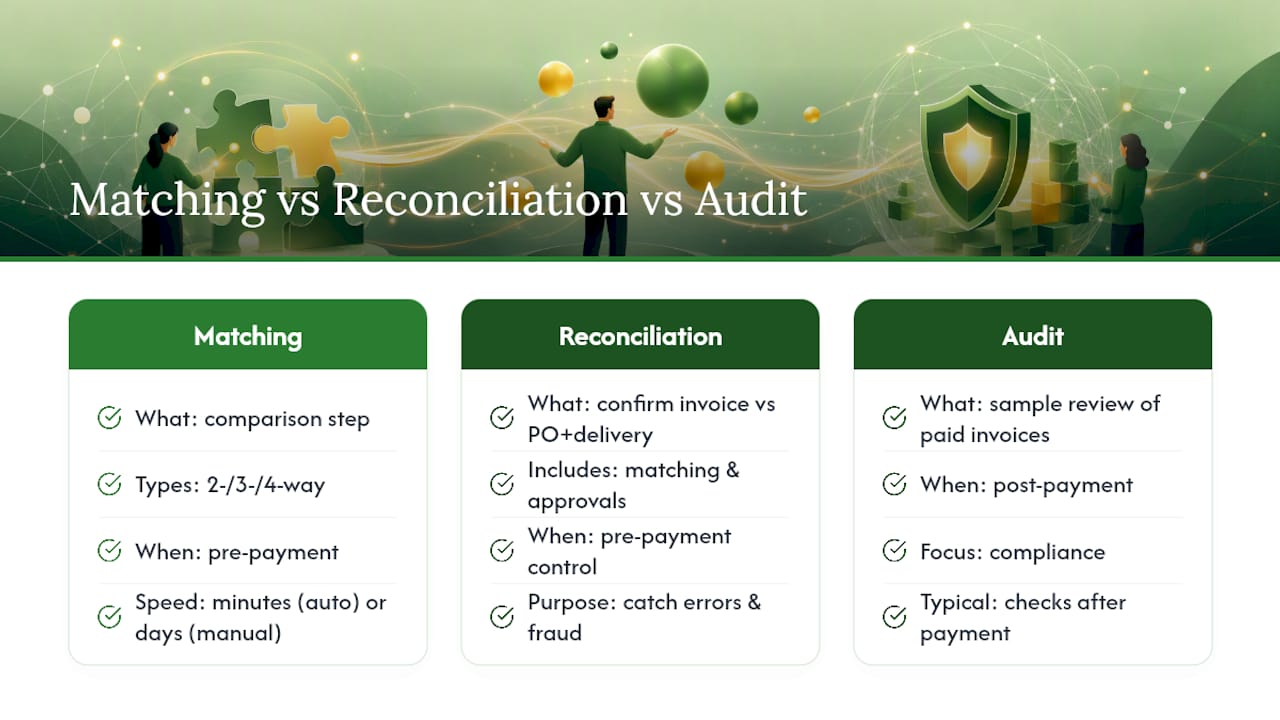
Invoice matching is the specific comparison step (two-way, three-way, or four-way), while invoice reconciliation is the broader process that includes matching, exception resolution, approval, and posting.
Is invoice reconciliation the same as an invoice audit?
They overlap but aren't identical. An invoice audit typically reviews a sample of already-paid invoices for compliance, while reconciliation happens before payment as a control gate.
How long should invoice reconciliation take?
With automation, matching can happen within minutes of receipt. Manual processes typically take a few days per batch, depending on exception volume and approval chains.
Can small businesses skip three-way matching?
Small businesses with low invoice volume can often rely on two-way matching for low-risk vendors, but any business handling physical inventory benefits from adding the goods receipt check.
This article is general information, not a substitute for advice from a qualified financial advisor. Consult a qualified financial professional about your own circumstances before acting on anything here.
Sources
- Accounts payable invoice matching - Finance | Microsoft Learn
- What Is Three-Way Matching? A Definitional Guide for AP Teams (and How to Automate It) | Corpay
- Invoice Reconciliation Meaning - WallStreetMojo
- Invoice Matching Explained: Types, Processes, and Benefits | Coupa
- Beancount