20–50 Document Test: Bank Statement Parsing Accuracy for Engineers

Bank statement parsing accuracy has three distinct layers, and vendors routinely quote only the most flattering one. Field-level accuracy measures whether individual data points, like a transaction amount or date, extracted correctly. Financial validation accuracy measures whether the derived totals, balances, and cash flow figures reconcile. For bookkeeping, professionals should require a high level of field-level accuracy. For lending or audit work, financial validation should clear 98 to 99%, since a perfect CER score can still produce a wrong loan decision.
TL;DR:
- Achieving at least 98 to 99% financial validation accuracy is crucial for lending and audit purposes, but most vendors only quote high character-level accuracy.
- Small improvements in accuracy, from 95% to 99.5%, can reduce manual review efforts by up to 90%, especially when catching significant transaction errors.
- Automated balance reconciliation and anomaly detection can identify most parsing failures, such as missing transactions and incorrect totals, before human review.
- Testing vendor claims requires evaluating field and financial validation accuracy on a representative sample of 20 to 200 diverse documents, not just character accuracy.
- Using deterministic, code-based calculations for totals and combining layout detection with structured rules improves overall parsing reliability in production.
Table of Contents
- What Do Character, Field, and Financial Validation Accuracy Actually Measure?
- Why Does a Few Percentage Points of Accuracy Matter So Much?
- What Are the Most Common Parsing Failure Modes?
- How Should You Test Parsing Accuracy Before Trusting It?
- Which Technology Choices Actually Improve Accuracy?
- How Do You Raise and Maintain Accuracy Once You're in Production?
- How TaxBatchPro Applies These Standards in Production
- What Should You Actually Require Before You Buy?
- Ready to Test Real Accuracy on Your Own Statements?
- Sources
What Do Character, Field, and Financial Validation Accuracy Actually Measure?
These three metrics answer different questions, and confusing them is how procurement teams get burned. Character-level accuracy (CER) counts how many individual characters an OCR engine reads correctly out of the total. A single misread digit, say a "3" read as an "8" in a $1,300 deposit, barely dents CER across a full page of text. But it turns that transaction into a completely different field-level error, and if that number feeds a running balance, it becomes a financial validation failure too.
Field-level accuracy asks a narrower question: did the system extract the correct value for a specific field, like an amount, date, or description? Compute it by dividing correctly extracted fields by total fields checked. For amounts, OCR accuracy on financial documents requires an exact-match rule; a good practice is allowing $0.01 tolerance only for rounding artifacts, never for OCR guesses.
Financial validation accuracy is the strictest layer. It checks whether calculated totals (deposits, withdrawals, ending balance) match the statement's own printed totals.
- Underwriting and lending need financial validation above all, since a bad total misrepresents cash flow.
- Bookkeeping and reconciliation lean on field-level accuracy for transaction-by-transaction correctness.
- Aggregated reporting needs both, because rollups compound small field errors into large validation gaps.
Why Does a Few Percentage Points of Accuracy Matter So Much?
At scale, small accuracy gaps stop being rounding errors and start being staffing problems, as detailed in how AI in finance boosts team productivity. Push accuracy to 99.5%, the level ClearStaq calls industry-leading, and the same batch drops to about 50 errors, a tenfold reduction in manual review.
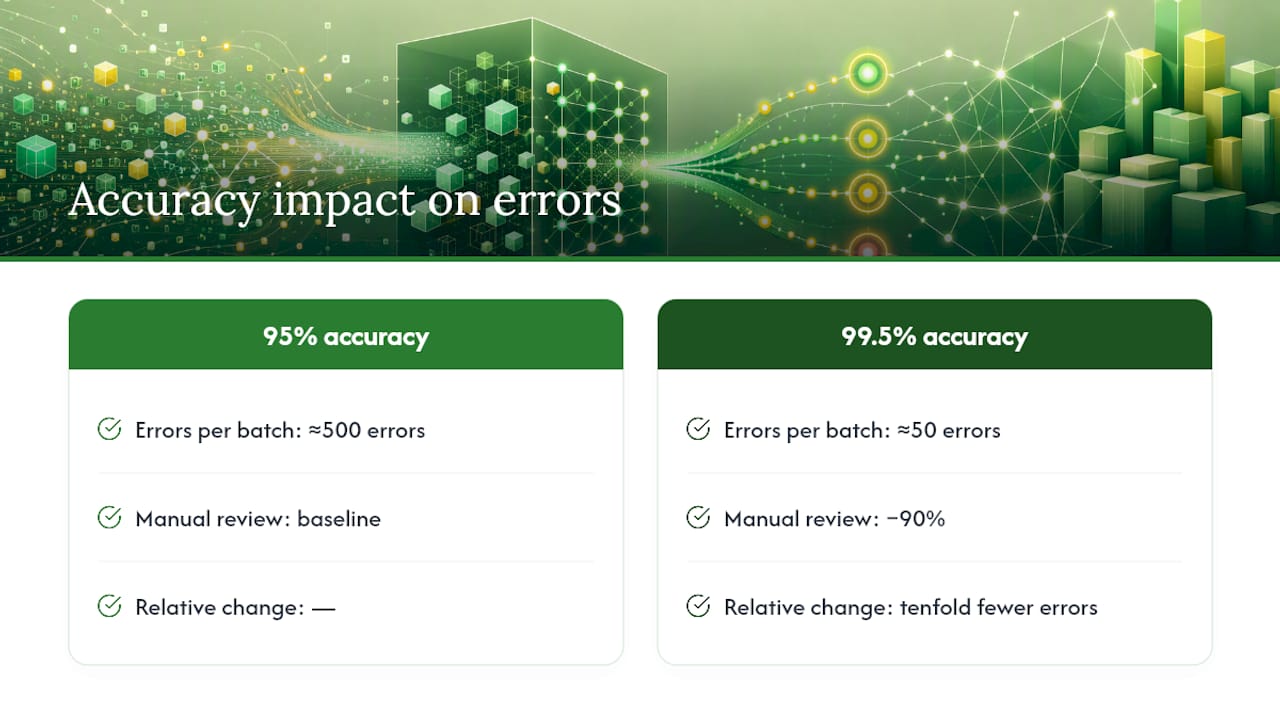
Not all errors cost the same. A misread merchant description is a nuisance; a flipped sign on a $4,000 withdrawal or a missed transaction can misstate a client's cash position entirely, which is far more expensive to catch after the fact than before.
The math is blunt: shaving accuracy from 95% to 99.5% doesn't just improve a report card, it removes 90% of the manual review queue.
What Are the Most Common Parsing Failure Modes?
Certain failures show up constantly across bank statement formats, and most are catchable with simple checks before a human ever opens the spreadsheet.
- Missing transactions — usually caused by page breaks splitting a table mid-row, silently dropping entries.
- Sign flips — a debit read as a credit, which throws off the entire running balance without triggering an obvious error.
- Wrong totals — the extracted transactions don't sum to the statement's printed total, often the clearest sign of a deeper extraction problem.
- Decimal misreads — $1,200.00 becomes $12,000 or $120, a common OCR failure on low-resolution scans.
- Page-split errors — multi-page statements where a table header repeats or a balance carries over incorrectly between pages.
Reconciling the sum of extracted transactions against the statement's stated ending balance catches most of these in one pass. Flag any account where the computed and printed balances disagree, and flag any transaction with an implausible amount (a $50,000 grocery charge, for instance) as an outlier worth a second look.
Pro Tip: Build an automated anomaly triage step that flags any statement failing balance reconciliation before it ever reaches a human reviewer. This alone can cut review time dramatically, since it lets your team focus only on the documents that actually broke.

How Should You Test Parsing Accuracy Before Trusting It?
A credible accuracy test starts with a representative sample, not a handful of clean PDFs from one bank. Pull 20 to 200 documents depending on how much format variance you expect, and make sure the set includes major national banks, regional credit unions, digital-native PDFs, clean scans, and at least a few rough phone-camera photos. Skipping poor-quality scans in your test set is the single easiest way to overestimate real-world performance.
Ground truth comes from manual, exact-match verification: every amount, date, and description checked against the source document with no tolerance beyond the standard $0.01 rounding allowance. From that ground truth, compute CER, field-level accuracy, and financial validation accuracy separately. Benchmark testing across nine extraction systems found that raw field reads often looked solved, clustering near 97 to 99%, while derived totals on the same documents ranged from 67 to 84%. Skip the aggregate check and you'll miss exactly the failures that matter most.
- Report all three metrics on a rolling dashboard, segmented by bank and document quality.
- Reassess monthly, or immediately after any change to OCR backend or extraction model.
Which Technology Choices Actually Improve Accuracy?
Template-based parsers work well when statement formats are stable and known in advance, but they break the moment a bank redesigns its layout. Full machine-learning models generalize better across unseen formats, but without guardrails they can hallucinate plausible-looking numbers that don't exist on the page. Hybrid pipelines, using ML for layout detection and structured rules for arithmetic, tend to outperform either extreme on financial documents specifically.
The single most consequential engineering decision is where totals get calculated. Deterministic, code-based aggregation of extracted rows produces dramatically more reliable results than asking a language model to generate a summary total in free text. One benchmark found a top system reaching 99.3% signal accuracy this way, while systems that let an LLM compute totals directly landed between 67% and 84%, even when their raw field reads looked fine.
- Compute every derived figure (total inflow, total outflow, net cash flow, average balance) from the actual transaction rows in code, and log the calculation path for debugging.
- Choose OCR backends with strong table-structure detection, not just text recognition.
- Preprocess images before extraction; correcting resolution and skew alone recovers three to five percentage points of accuracy on scanned documents.
- Treat open-source components like pluggable OCR/LLM extraction SDKs as a starting architecture, not a finished validation layer.
How Do You Raise and Maintain Accuracy Once You're in Production?
Accuracy isn't a one-time benchmark. It degrades quietly as new bank formats appear, unless you build the following into your operational routine.
- Preprocessing checklist: target at least 300 DPI on scanned inputs, deskew every page, boost contrast on faded thermal-style statements, and split multi-page tables at header boundaries rather than arbitrary page breaks.
- Validation rules: reconcile the sum of extracted rows against the printed ending balance, check running-balance math line by line, and confirm debit/credit sign consistency across the full statement.
- Operational controls: sample a fixed percentage of processed statements weekly for manual audit, route anything failing validation into an error queue, and set a retraining trigger whenever a specific bank format's accuracy drops below your threshold.
Real-time monitoring segmented by bank format catches degradation before it becomes a client-facing problem, rather than after a quarter's worth of statements has already gone out the door.
Pro Tip: Set your retraining trigger at the format level, not the account level. If one regional bank's new statement template drops accuracy by even two points, that's the signal to update, long before it shows up in your aggregate numbers.
How TaxBatchPro Applies These Standards in Production
TaxBatchPro processes a year's worth of bank and credit card statements into structured Excel output in under 90 seconds through batch upload, mapping transactions directly to IRS Schedule C categories for accountants and small business owners. Aggregates like totals and running balances are computed deterministically from extracted transaction rows, not generated freeform, which is the same architectural choice that separates high signal accuracy from unreliable totals in independent benchmarking. Every batch runs through financial validation checks before export, so discrepancies surface before they reach a client's books.
What Should You Actually Require Before You Buy?
Vendor accuracy claims are marketing until you've tested them yourself. Before piloting any parsing solution, insist on running your own 20 to 50 document test set spanning your actual mix of banks and scan quality, and require the vendor report field-level accuracy and financial validation accuracy separately, not a blended CER number.
A vendor confident in its numbers will welcome this test rather than resist it. Favor measurable outcomes on your own documents over any headline percentage in a case study, since character-level accuracy figures are the ones vendors quote most because they're the highest, not because they're the most relevant to your risk.
— Ian
Ready to Test Real Accuracy on Your Own Statements?
Most teams evaluating parsing accuracy spend weeks building test infrastructure before they run a single document. TaxBatchPro skips that step: batch upload a stack of statements and get structured, Schedule C mapped Excel output back in under 90 seconds, so you can measure field accuracy and financial validation on your own files instead of trusting a vendor's benchmark.
The platform is built specifically for the workflows this guide covers, audit-ready exports, dynamic table extraction across scan qualities, and deterministic aggregate calculation rather than freeform totals. If you're procuring or piloting a parsing solution, run the 20-document test set described above using the free converter first, then compare results against whatever vendor claims you've been quoted. For firms ready to move past testing, TaxBatchPro's accountant tools support batch processing and IRS-ready exports at production scale, and the pricing page outlines plans for individuals up through full firms.
Sources
- Bank Statement Extraction Benchmark: 9 AI Systems Tested (2026) | Kita
- Bank Statement OCR Accuracy: What the Numbers Actually Mean | Fintract
- Bank statement parsing accuracy: Why 99.5% matters & how we hit it | ClearStaq